
The browser built for AI agents
A Chromium fork with the MCP server built in. Every agent gets its own name, logins and tab group, with zero prompts and nothing to install.
v0.1.0 · macOS arm64 · Linux x64 · Windows via WSL2 · open source
Space Shuttle Discovery
From Wikiverse, the free encyclopedia
Space Shuttle Discovery (OV-103) is a retired orbiter of NASA's Space Shuttle program. It flew 39 missions, more than any other orbiter.
Discovery deployed the Hubble Space Telescope in 1990 and flew both "Return to Flight" missions, after the Challenger and Columbia disasters.
Retirement
After its last mission, STS-133 in 2011, Discovery went on display at the Smithsonian's Steven F. Udvar-Hazy Center in Virginia.
| Discovery before launch | |
| Type | Space Shuttle orbiter |
|---|---|
| First flight | Aug 30, 1984 (STS-41-D) |
| Last flight | Feb 24 – Mar 9, 2011 (STS-133) |
| Missions | 39 |
| Time in space | 365 days |
| Status | Retired, on display |
Your agents, at work.
Ask in Claude Code, Codex or any MCP client. Shuttle gives the agent a browser that's already set up.
Research behind a login
Sign the agent in to your tools once. It reads dashboards, inboxes and docs the next day without asking again.
Test your app
A QA agent clicks through staging in its own tab group. Attach Playwright to the same session when you need assertions.
Run agents side by side
Three agents, three tab groups, three sets of cookies. Nobody steals anyone's tab.
Agents
Every agent gets
its own identity.
Name it, give it a color and an avatar. Its tabs show up in your window as its own tab group, so you always know who is doing what.
Sessions are tab groups
Each session an agent opens is a labeled, colored tab group in your normal window. Watch it work, or ignore it.
chrome://agents
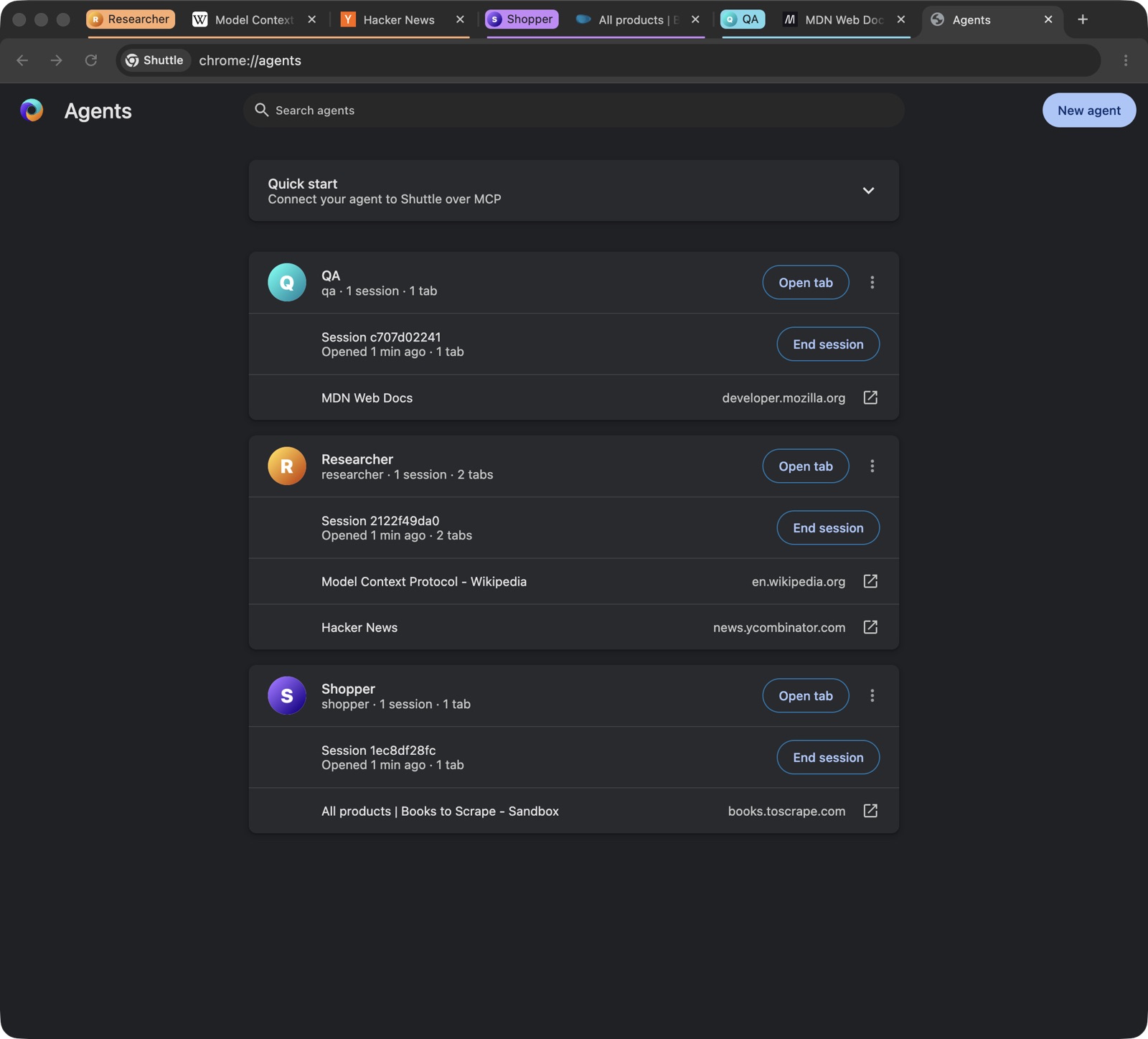
Create and edit agents, see their sessions and tabs, and copy the quick-start commands.
Avatars on the tab groups
Each agent's tab group carries its avatar and name. Hand a tab to an agent, or take it back.
Private
Logged in. Isolated.
Agents keep their own logins. Yours stay yours.
Restarted 3 times · still signed in
ws://127.0.0.1:9222/devtools/session/7f3aShopper's session: 2 tabs visible, everything else hidden
$ curl -H 'Origin: https://evil.example' 127.0.0.1:9222/mcp
HTTP/1.1 403 Forbidden
$ curl -H 'Host: attacker.test' 127.0.0.1:9222/json
Host header is specified and is not an IP address or localhost.
$ claude mcp list
shuttle: http://127.0.0.1:9222/mcp ✓ connected
Shared
One browser.
Every agent on your team.
Run Shuttle on a dedicated machine and connect from anywhere on your network or tailnet. Each agent keeps its own logins and its own tab group in one shared browser. No extra profiles, no window juggling, no crossed sessions.
Always on
A Mac mini or a Linux box keeps every agent's browser and logins ready, day and night. Nobody's laptop has to stay open.
Side by side, never mixed
Teammates, scripts and CI jobs drive the same browser at once. Every agent works in its own tab group with its own cookies.
Private until you open it
Shuttle listens on localhost by default. Turn on network mode and every remote client needs your access token. Web pages are still shut out.
# On the Shuttle machine (a Mac mini, a Linux box)
open -a Shuttle --args --shuttle-listen=0.0.0.0
cat ~/Library/Application\ Support/Shuttle/ShuttleAccessToken

# On every other machine
claude mcp add --transport http shuttle http://shuttle-box:9222/mcp \
  --header "Authorization: Bearer <token>"
Fast
Zero setup.
Zero prompts.
The MCP server is part of the browser. No npx, no Node, no extension, no dialog to click away.
No approval dialog
Agents connect without anyone clicking "Allow".
No automation banner
Pages look the way they look for you.
No webdriver flag
navigator.webdriver is false, and no window opens at startup.
Connected in one line
Launch Shuttle, run one command, ask your agent to browse. It serves MCP at http://127.0.0.1:9222/mcp.
- 1Open Shuttle
- 2
claude mcp add … shuttle - 3“Open a session and check my orders”
See the difference.
Shuttle next to the usual ways of giving an agent a browser.
ShuttleDevelopers
MCP when you want it.
CDP when you need it.
Any MCP client with HTTP transport works. Every session also gets its own CDP endpoint for Playwright or agent-browser, scoped to that session.
claude mcp add --transport http shuttle http://127.0.0.1:9222/mcpcodex mcp add shuttle --url http://127.0.0.1:9222/mcp{
"mcpServers": {
"shuttle": { "url": "http://127.0.0.1:9222/mcp" }
}
}import { chromium } from 'playwright'
// cdpEndpoint comes from the open-session MCP tool
const cdpEndpoint = 'ws://127.0.0.1:9222/devtools/session/<id>'
const browser = await chromium.connectOverCDP(cdpEndpoint)
const page = browser.contexts()[0].pages()[0]
await page.goto('https://example.com')agent-browser --cdp ws://127.0.0.1:9222/devtools/session/<id> open https://example.com
agent-browser --cdp ws://127.0.0.1:9222/devtools/session/<id> snapshot21 MCP tools
Lean
Lean, private,
open source.
A deep fork of Chromium with everything agents don't need taken out. No Google account, no telemetry.
Taken out
Tens of thousands of files cut from the Chromium tree.
Still there
The web platform and the tools you still want.
BSD-3-Clause
The browser and the tooling that builds it are on GitHub. Follows Chromium stable (154.0.8037.129).
Frequently asked questions
Is Shuttle a Chrome extension?
No. It is a fork of Chromium with the MCP server inside the browser. Nothing to install on top.
Which platforms are supported?
macOS (arm64) and Linux (x64). On Windows, run the Linux build in WSL2.
Does it collect telemetry?
No. Google services, sync, sign-in and telemetry are removed.
Which clients work?
Any MCP client with HTTP transport: Claude Code, Codex, Cursor and others. Or connect Playwright or agent-browser over CDP.
Will it use my own logins?
No. Each agent has its own storage, isolated from your browsing and from other agents. An agent logs in once and stays logged in.
Is it production ready?
It is a first release (v0.1.0): it works daily for us, but there is no auto-update yet, open codecs only (no H.264-only video, no Widevine).
License?
BSD-3-Clause, like Chromium.
Give your agents
a browser of their own.
Shuttle 0.1.0. Signed and notarized for macOS (Apple silicon), a tarball for Linux x64, and WSL2 on Windows.